
Hyundai i30 (PD): Convenient features of your vehicle / Instrument cluster
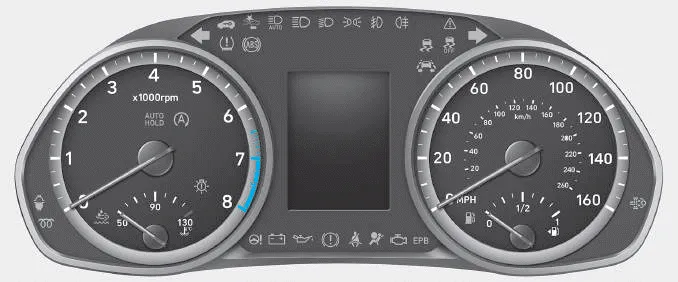
â– Type A
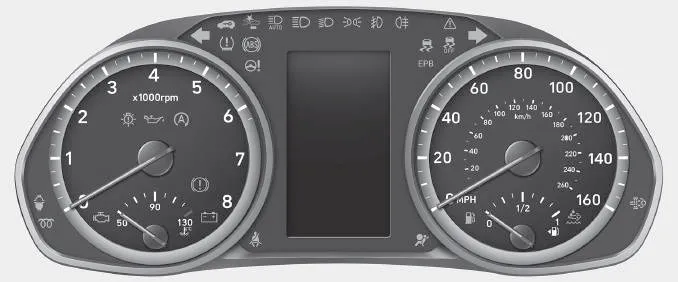
â– Type B
1. Tachometer
2. Speedometer
3. Engine coolant temperature gauge
4. Fuel gauge
5.Warning and indicator lights
6. LCD display (including Trip computer)
- Instrument cluster control
- Gauges and meters
- Transmission shift indicator
- Warning and indicator lights
- LCD display messages
Opening the fuel filler door 1. Turn the engine off. 2. Ensure the driver's door is unlocked. 3. Push the fuel filler door near the 3 o'clock position.
Instrument panel illumination When the vehicle's position lights or headlamps are on, press the illumination control button to adjust the brightness of the instrument panel illumination.
Other information:
Hyundai i30 (PD) 2018-2024 Owner's Manual: Low aspect ratio tyres
A low aspect ratio tyre, of which the aspect ratio is lower than 50, is designed for a sporty-look vehicle. The low aspect ratio is to optimize handling and braking. Thus, it may be uncomfortable to ride and it may generate noises, in comparison with a normal tyre.
Hyundai i30 (PD) 2018-2024 Owner's Manual: Rear fog lamp
1. Loosen the pin-type retainers and screws of the rear wheel guard and then detach it from the rear bumper. 2. Reach your hand into the back of the rear bumper. 3. Remove the socket from the housing by turning the socket counterclockwise until the tabs on the socket align with the slots of the housing.
Categories
- Manuals Home
- Hyundai i30 Owners Manual
- Fuses
- Drive mode integrated control system
- Warning and indicator lights
- New on site
- Most important about car
