
Hyundai i30 (PD): Exterior lights / Front fog lamp
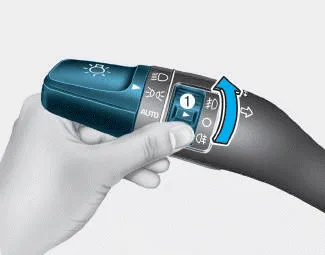
Fog lamps are used to provide improved visibility when visibility is poor due to fog, rain or snow, etc. Use the switch next to the headlamp switch to turn the fog lamps ON and OFF.
1. Turn on the position lamp.
2. Turn the light switch (1) to the front fog lamp position.
3. To turn off the front fog lamp, turn the light switch to the front fog lamp position again or turn off the position lamp.
NOTICE
When in operation, the fog lamps consume large amounts of vehicle electrical power. Only use the fog lamps when visibility is poor.
To signal a turn, push down on the lever for a left turn or up for a right turn in position (A). To signal a lane change, move the turn signal lever slightly and hold it in position (B).
Vehicle with front fog lamp To turn on the rear fog lamp: Position the light switch in the position lamp position, turn the light switch (1) to the front fog lamp position, and then turn the light switch (1) to the rear fog lamp position.
Other information:
Hyundai i30 (PD) 2018-2024 Owner's Manual: If the engine overheats
If your temperature gauge indicates overheating, you experience a loss of power, or hear loud pinging or knocking, the engine may be overheating. If this happens, you should: 1. Pull off the road and stop as soon as it is safe to do so. 2.
Hyundai i30 (PD) 2018-2024 Owner's Manual: Wheel alignment and tyre balance
The wheels on your vehicle were aligned and balanced carefully at the factory to give you the longest tyre life and best overall performance. In most cases, you will not need to have your wheels aligned again. However, if you notice unusual tyre wear or your vehicle pulling one way or the other, the alignment may need to be reset.
Categories
- Manuals Home
- Hyundai i30 Owners Manual
- Exhaust System (DPF) Warning Light. Glow Indicator Light
- LKA system operation
- Specifications & Consumer information
- New on site
- Most important about car
